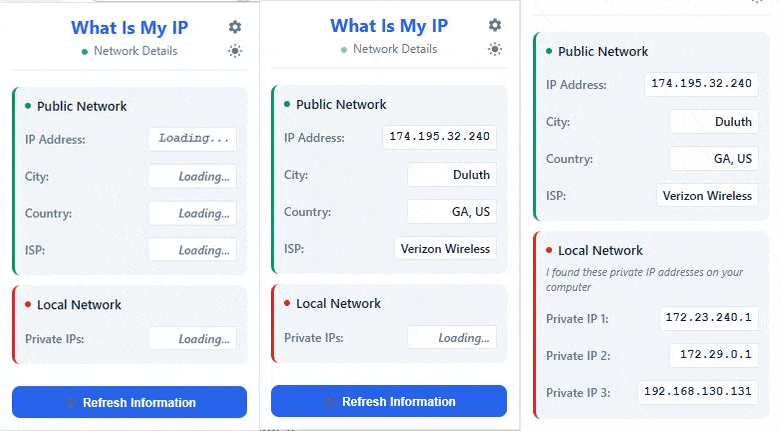
Get instant access to your public IP address, geolocation data, ISP information, and private network details with our secure browser-based IP checker tool. No web visits required - check your internet protocol details directly from Chrome.
Network Details
Get comprehensive network information in a clean, easy-to-read interface
View your public IP address, geolocation, ISP details, and connection information instantly.
Discover all private IP addresses on your local network for troubleshooting and network management.
Get your IP information instantly with one click. No waiting, no loading screens.
We don't store or track your IP information. Everything stays private and secure.
Refresh your network information anytime to get the most current data about your connection.
Clean, intuitive interface that anyone can use. No technical knowledge required.
Advanced browser-based network analysis that protects your privacy while delivering accurate results
Our Chrome extension uses secure WebRTC and browser APIs to detect your internal network configuration without sending data to external servers.
We query trusted IP geolocation databases to provide accurate city, country, and ISP information while maintaining your privacy.
Advanced network interface detection identifies all private IP addresses on your local network for comprehensive troubleshooting.
Unlike web-based IP checkers, our extension works locally in your browser. No browsing history tracking, no data storage, no privacy concerns.
Whether you're working remotely, troubleshooting networks, or checking your privacy, we've got you covered
Quickly verify your VPN connection is working and check which geographic location you appear to be browsing from. Essential for remote workers accessing geo-restricted content.
Diagnose network issues by checking both public and private IP addresses. Perfect for IT professionals and anyone managing home networks or small business setups.
Monitor your internet protocol exposure and ensure your IP address matches your expected location. Ideal for privacy-conscious users and security audits.
Instant access to network details for web development, API testing, and server configuration. No need to visit multiple websites - everything in one click.
Everything you need to know about IP addresses and our Chrome extension
Your IP address is a unique identifier assigned to your device when connecting to the internet. It reveals your approximate geographic location and ISP information. Knowing your IP address helps with network troubleshooting, privacy checks, and verifying VPN connections.
Most internet providers assign dynamic IP addresses that change periodically. Your IP address also changes when you connect through VPNs, switch networks, restart your router, or use mobile data. Our extension helps you track these changes easily.
Your public IP address is how the internet sees your connection - it's assigned by your ISP and visible to websites. Private IP addresses (like 192.168.x.x) are used within your local network to identify individual devices. Our extension shows both types.
Yes, absolutely. Unlike web-based IP checkers, our extension works locally in your browser without sending your browsing data to external servers. We don't track, store, or share any of your network information.
IP geolocation is typically accurate to the city level, with precision varying by location and ISP. Rural areas may show broader regions, while urban areas are usually very accurate. The ISP information is highly reliable as it's directly tied to your IP assignment.
Yes! This is one of the most common use cases. Simply check your IP address and location before and after connecting to your VPN. If the location changes to your VPN server's location, your VPN is working correctly.
Partially. The extension can detect your local network information (private IP addresses) while offline, but requires an internet connection to determine your public IP address, location, and ISP details.
Our browser extension offers instant access without page loading, doesn't track your browsing history, shows local network details that websites can't access, and works consistently without depending on external sites being available.
Installing What Is My IP is quick and easy. Follow these simple steps to start checking your IP information right away.
Click "Add to Chrome" from the Chrome Web Store and confirm the installation.
Open the Chrome extensions menu and click the pin icon next to What Is My IP to keep it handy.
Click the extension icon in your toolbar to instantly view your IP information from any webpage.
Comprehensive documentation to help you master IP detection and network troubleshooting
Complete step-by-step guide to testing VPN connections, detecting IP leaks, and troubleshooting VPN issues.
Read VPN Guide →Expert solutions for IP conflicts, DHCP problems, DNS errors, and connectivity troubleshooting.
View Troubleshooting Guide →Detailed overview of all IP detection capabilities, geolocation features, and network analysis tools.
Explore Features →Answers to common questions about IP addresses, geolocation accuracy, privacy, and extension usage.
Browse FAQ →Click the What Is My IP icon in your Chrome toolbar
Instantly see your public IP, location, and network details
Click refresh to get updated information whenever needed